PhoXo

 ​​Download
PhoXoSee Release Notes

v1.11 (Build 2605) – April 23, 2026

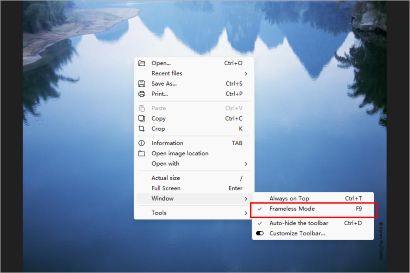
  • New: Added an option for ​frameless window mode.
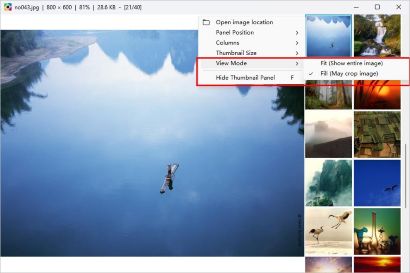
  • New: Added display mode settings (Fit | Fill) to the thumbnail list panel.
  • Fix: Improved scrolling performance. Thumbnail list scrolling is now much smoother.
  • Fix: Fixed an issue where window position was not correctly restored in multi-monitor setups.

v1.10 (Build 2604) – April 12, 2026

  • New: Real-time file size estimation for JPEG and WebP during resize.
  • New: Thumbnail list now supports docking on all sides (top, bottom, left, right).
  • New: Added keyboard support for the thumbnail list.
  • New: Added Slovenian language (thanks to Andrew Poženel).
  • Fix: Fixed an issue where images could not be retrieved from the clipboard (e.g., VMware, Inkscape).
  • Fix: Fixed an issue where the alpha channel could be lost when saving BMP files.

v1.9 (Build 2603) – March 29, 2026

Hotfix: Fixed a slight flicker on startup caused by recent improvements for multi-monitor and multi-DPI support.

v1.9 (Build 2602) – March 27, 2026

A brand-new editing component is here!
Crop Tool: Pixel-perfect cropping with rectangle, rounded rectangle, and circle shapes, customizable ratios, and easy drag-and-drop control.
Supports multiple DPIs and multiple monitors.
Fix: Window position was incorrect on multi-monitor setups.
Fix: Added support for older CPUs without AVX instructions.

v1.8 (Build 2601) – January 29, 2026

  • New: ​Ability to get the current wallpaper. 
  • New: ​Added OCR functionality. 
  • Fix: Searching empty directories could hang. 

v1.7 (Build 2505) – December 28, 2025

  • New: Option to always display images at highest quality for sharper large-image viewing.
  • New: Support for Windows 11 Explorer context menu.
  • New: Faster startup and improved overall performance.
  • Fix: Window could no longer be dragged while viewing images in fullscreen.
  • Fix: Resolved issue where files could be accidentally deleted when printing.
  • Fix: Adjusted interface layout for a cleaner, more consistent look.

v1.6 (Build 2504) – October 21, 2025

  • Move the window by clicking and dragging the image.
  • Automatic background adjustment for SVG images when too li​ght or too dark in the current theme.
  • Checkerboard background for transparent images.
  • JPEG XL (JXL) support.
  • Fixed blurring issue when opening AVIF images.
  • Improved file association handling.
  • Added zoom speed control for image scaling.
  • Fixed errors during overwrite installation.

v1.5 (Build 2503) – May 21, 2025

  • New feature: ​Added thumbnail support for HEIC, SVG, PSD, and TGA in Windows Explorer.
  • Added an option to permanently delete files (Do not move to Recycle Bin).
  • Added support for HEIC and Adobe DNG when searching photos by date taken.
  • Added a fullscreen option for double-click behavior.
  • Fixed a bug where images couldn't be opened due to long file paths.
  • Fixed a startup lag caused by image preloading.
  • Fixed a bug that caused some SVG files ​to fail to load.
  • Added Polish translation.

v1.4 (Build 2502) – May 5, 2025

  • Toolbar now supports customization.
  • New feature: Reopen last image o​n startup.
  • New feature: Quickly set the color scheme by holding Shift.
  • Fixed an issue preventing some JP2 files from opening.
  • Fixed missing text in some SVG files.
  • Fixed blurriness when opening small images.

v1.3 (Build 2501) – April 8, 2025

  • Added "Recent Files" feature.
  • Added batch HEIC to JPEG conversion feature.
  • Special optimizations for HEIF/HEIC cache to accelerate image viewing in this format.
  • Resolved blurring issue with some very large images when hardware acceleration is enabled.
  • Improved multilingual loading module, resulting in faster startup.
  • Fixed issue with transparent PNG backgrounds in the thumbnail list.
  • Fixed issue where some HEIC files could not be opened.
  •  Thanks to VenusGirl for ​helping with the Korean translation.

v1.2 (Build 2403) – July 21, 2024

  •  ​​Add a bottom thumbnail list to display images in the folder.
  •  ​​​Add the Ukrainian translation.
  • Thanks to ​Eugene Bulbaka for ​helping with the Ukrainian translation.

v1.1 (Build 2402) – June 26, 2024

  • Add support for HEIF, HEIC, and AVIF image files.
  • Changed the cursor to a hand shape when zooming in on images.
  • Thanks to ​Dmitry Yerokhin for ​helping with the Russian translation.

v1.0 (Build 2401) – June 14, 2024

Hi, my friends, I'm back.

For various reasons, I stopped developing PhoXo for nearly ten years. However, I have not abandoned it. The fact that you can still access this domain is the best proof of that.

PhoXoSee, an image viewing software, is my first creation after rising from the ashes. I spent several months refining its performance. Install it and scroll your mouse wheel to experience its incredible image viewing speed.

I won't be adding more features to the main program; its speed will only get faster with updates. Next, I'll release an image editing software called PhoXoMini to complement it. The goal is to combine fast viewing with fast editing.

Today is a new beginning, and the future will be better.